15.6in Waterproof Anti-Theft Backpack w/ USB Charge Port
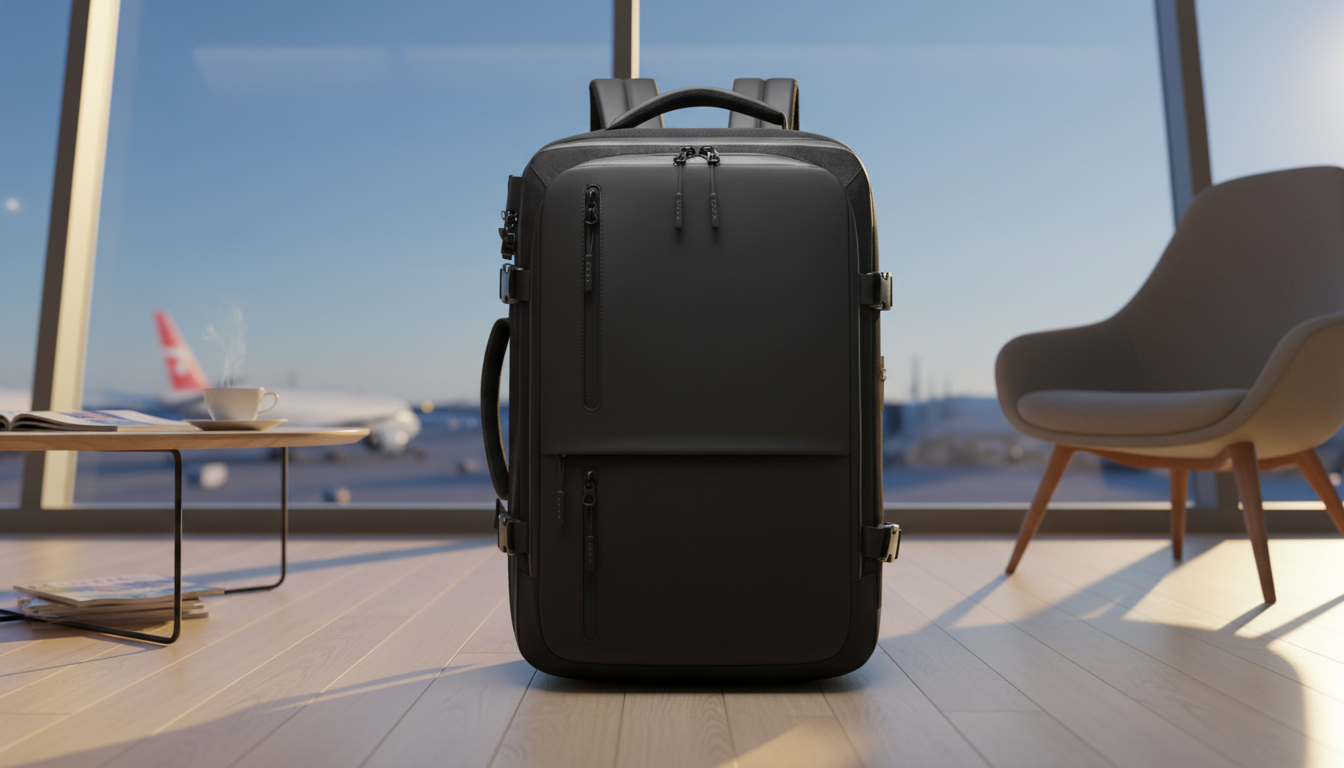
Waterproof Anti-Theft Laptop Backpack with USB Charging Port (Fits 15.6″ Laptops)
A dependable everyday backpack should keep a laptop protected, make valuables harder to access for pickpockets, and keep essentials organized—without turning into a bulky, uncomfortable carry. This waterproof anti-theft laptop backpack adds a USB charging port for easy on-the-go power access and a dedicated compartment sized for up to 15.6″ laptops, making it a strong fit for commuting, campus days, business travel, and weekend carry.
What makes this backpack a practical daily carry
Daily carry is all about predictable performance: it needs to handle weather, crowds, and the stop-and-go rhythm of modern routines. This bag is built around a few details that matter most when you’re moving fast.
- Water-resistant exterior: Helps shield electronics and documents from rain, splashes, and damp surfaces.
- Anti-theft design emphasis: Focuses on reducing easy access to valuables during crowded commutes.
- USB charging port: Provides a convenient way to route a power bank connection for phone charging while walking or waiting.
- 15.6″ laptop compatibility: Supports common work and school devices without needing an oversized bag.
- Streamlined profile: Suits public transit, office settings, and carry-on travel without feeling awkward in tight spaces.
If you’re ready to outfit a week of commutes and travel days, start with the Waterproof Anti-Theft Laptop Backpack with USB Charging Port – Fits 15.6″ Laptop.
Laptop fit and protection: what “fits 15.6″” means in real use
“15.6-inch laptop” is a screen measurement, not a guarantee of identical body size across brands. Some 15.6″ models run thicker, have extended hinges, or include large bezels that change the overall footprint.
- Check physical dimensions: Confirm your laptop’s width × depth × height rather than relying only on screen size.
- Use the dedicated padded area: A separate padded compartment helps prevent the laptop from sliding into the bottom of the bag.
- Minimize shifting: A secure closure and snug fit reduce movement while walking, biking, or setting the bag down.
- Add a slim sleeve if needed: If you carry heavier items (chargers, books, water bottles) in the same pack, a thin protective sleeve adds a helpful buffer.
A reliable packing habit also helps: keep the laptop closest to the back panel, and avoid placing hard, heavy items directly against it.
USB charging port: how it works and how to use it safely
The USB port on backpacks like this is typically a pass-through connection—meaning the backpack doesn’t generate power on its own. Instead, your power bank stays inside the bag, and a short cable links the power bank to the backpack’s internal connector. Outside, you plug your phone cable into the external port for quick access.
- Pick the right power bank capacity: Many commuters find 10,000–20,000 mAh convenient for full-day use.
- Prevent strain: Keep the power bank in an interior pocket so the cable doesn’t tug during movement.
- Avoid charging in heavy rain: Water resistance helps with splashes, but active charging in a downpour can still be risky.
- Use quality cables: Cheap or frayed cables can overheat or fail—especially around the port where bending is common.
For air travel, it’s also smart to know current screening expectations for portable chargers; the TSA guidance on power banks and portable chargers is a helpful reference before you head to the airport.
Anti-theft features that matter on commutes and in airports
No backpack can “guarantee” theft prevention, but design can reduce common opportunities—especially in crowded buses, trains, event lines, and security checkpoints.
Organization for work, school, and travel
If you’re also juggling family essentials, a purpose-built alternative like the Large-Capacity Multi-Function Diaper Backpack for Everyday Parenting can make organization even easier when bottles, wipes, and extra clothing join the daily loadout.
Comfort and carry: what to look for on long days
Quick comparison: everyday use scenarios
| Situation | Most useful feature | Why it helps | Setup tip |
|---|---|---|---|
| Public transit commute | Anti-theft access + concealed pocket | Reduces quick-grab opportunities in crowded areas | Keep phone/wallet in concealed pocket; close main compartment fully |
| Rainy walk to class | Water-resistant exterior | Helps protect laptop and papers from light rain and splashes | Store documents in an inner sleeve or folder for extra protection |
| Long day on campus | Padded straps + organization | Improves comfort and keeps supplies easy to find | Pack heavier books close to the back panel |
| Airport and day trips | 15.6″ laptop compartment + compact profile | Supports work device while staying easy to stow | Keep chargers/power bank in a single pouch for faster screening |
| Phone charging on the go | USB charging port | Convenient access to power without opening the bag | Use a short internal cable from power bank to port to reduce tangles |
Care tips to keep the backpack looking new
For general best practices when buying online—especially around returns and safe checkout habits—the FTC’s online shopping tips are a useful refresher.
Product details at a glance
FAQ
Does the USB charging port come with a power bank?
No—most USB backpack ports are pass-through connections, so a separate power bank is typically required. Place your power bank inside the backpack and connect it to the internal cable/connector so the outside port can power your phone cable.
Will it fit a 15.6″ laptop with a bulky case?
It depends on the laptop’s physical dimensions and how thick the case is. Check your laptop’s width, depth, and height and allow extra clearance for rigid shells or padded covers.
How waterproof is the backpack for rain?
It’s designed to be water-resistant for rain and splashes, not for submersion. For extra protection, keep papers in an interior sleeve and avoid charging devices during heavy downpours.









Leave a comment