Mini WiFi Underwater Camera Boat: Live View & Remote
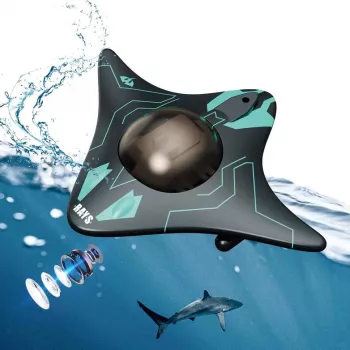
Mini WiFi Remote Control Underwater Camera Boat with Real-Time Transmission
A compact camera boat can help scout underwater structure, monitor fish activity, and inspect areas that are hard to see from shore or deck. This mini WiFi remote-control underwater camera boat is designed for quick setup, live viewing on a phone, and simple remote navigation for short-range exploration in calm waters.
What This Mini Camera Boat Is Built For
This type of mini underwater camera boat is most useful when a full-size sonar setup or a dedicated underwater inspection camera is overkill. It’s made for quick, visual “what’s down there?” checks—especially in protected water where you can keep the boat within reliable WiFi range.
- Real-time underwater viewing for scouting near docks, shoreline edges, and calm coves
- Finding underwater features like weed lines, rocks, drop-offs, and submerged timber
- Checking water clarity and bottom composition before casting or placing bait
- Light inspection tasks around small boats (visual checks near hull/line areas) where safe and practical
Core Features That Matter on the Water
The best experience comes from how quickly you can steer, view, and adjust without constantly pulling the unit back in. Real-time transmission is the whole point: the moment you see a transition line or a snaggy zone, you can react immediately.
- WiFi live transmission: sends the camera feed to a nearby phone for on-the-spot decisions
- Remote control handling: helps guide the camera to specific spots instead of relying on drifting
- Compact “mini” form: easier to carry in a tackle bag and quicker to deploy than larger rigs
- Real-time feedback loop: steer, watch the feed, and adjust position without pulling the unit back each time
Because WiFi is based on IEEE 802.11 standards, performance depends heavily on antenna placement, the phone’s receiver, and interference—especially outdoors near other devices. For background on how WiFi works at a standards level, see the IEEE 802.11 Wireless LAN Standards Overview.
Quick Start: From Box to First Launch
Most frustrations come from rushing the first setup. A short, controlled test run makes the first real scouting session much smoother.
- Charge fully before first use to get consistent runtime and stronger WiFi stability
- Pair the boat/camera WiFi to the phone (use the device’s WiFi network, then open the viewing app if provided)
- Test the live view on land first to confirm the feed, orientation, and any on-screen controls
- Choose calm water for first runs; avoid current, heavy chop, or dense vegetation until familiar with handling
- Do a short-range test (a few meters/yards) to confirm steering response and video smoothness before going farther
Getting Clearer Underwater Video
Underwater visibility is as much about technique as it is about camera hardware. The biggest difference-maker is how you move the boat and where you point it.
- Aim for shallow, calm, and clearer water when learning—silt and algae can reduce visibility quickly
- Move slowly near the bottom to avoid stirring sediment; slow approach often improves clarity
- Scan structure from multiple angles: a small course change can reveal edges and openings
- If reflections or glare are an issue, change the viewing angle and keep the camera below surface disturbance
- In low light, keep expectations realistic—water absorbs light fast, so short viewing distances are normal
Real-Time Transmission: What to Expect in Practice
“Real-time” on a small WiFi platform typically means a live feed that’s responsive enough for steering and scouting, with occasional stutters depending on conditions. Treat the connection like a short-range tool: stay close, keep the boat visible, and adjust if the signal gets unstable.
Use Ideas: Fishing, Scouting, and Simple Inspections
Specs and Buying Checklist
At-a-Glance Checklist
| Item | Why it matters | What to confirm before using |
|---|---|---|
| WiFi connection | Controls the live view reliability | Line-of-sight to the boat and short first test run |
| Remote control response | Precise steering to target areas | Verify forward/turning response on land, then in shallow water |
| Water conditions | Chop/current affects stability and signal | Prefer calm water; avoid heavy weeds during early use |
| Battery management | Prevents mid-run shutdown | Start fully charged; plan a return buffer before battery is low |
| Phone readiness | Prevents disconnects and interruptions | Disable aggressive battery saver; keep screen on during use |
If the product lists a water resistance or “IP” rating, it helps to understand what that rating actually means. The official reference is the IEC 60529 IP Code standard, which defines protection levels for enclosures.
Care, Storage, and Safety Basics
For general guidance on staying safe around boats and waterways, review the U.S. Coast Guard Recreational Boating Safety resources.
Common Issues and Fast Fixes
Shop In-Stock Picks
- Mini WIFI Remote Control Underwater Camera Boat with Real-Time Transmission ($33.67)
- Pet Deshedding Brush for Cats & Dogs – Removes Loose Hair & Tangles ($9.51)
- Large-Capacity Multi-Function Diaper Backpack for Everyday Parenting ($72.01)
FAQ
Does real-time transmission work without cellular service?
Yes—live viewing typically uses a direct WiFi connection between the boat/camera and your phone, so cellular service isn’t required. Stability still depends on distance, line-of-sight, and local interference.
How far can the WiFi signal reach on the water?
Range varies a lot with your phone, waves, wind, and obstacles, so it’s best to treat it as short-range and test gradually. Keeping the boat in clear line-of-sight and staying closer usually provides the most reliable feed.
Can it be used in rivers or strong current?
It’s best suited to calm water because current can overpower a mini hull, increase drift, and make retrieval difficult. For safety and consistent video, avoid fast-moving water and use protected coves, ponds, or sheltered shorelines instead.









Leave a comment