Reset a Mechanical Push Button Door Lock: Easy Steps
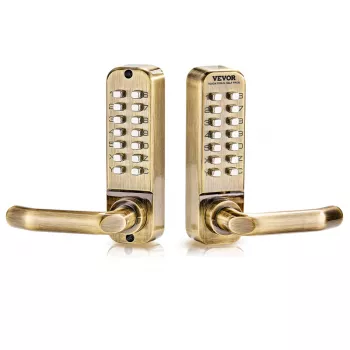
How to reset a mechanical push button door lock?
Resetting a mechanical push button door lock usually means changing the access code on a keyless, battery-free keypad lock. The exact steps vary by brand, but most models follow the same pattern: open the door, access the back side of the lock, switch it into “program” mode, set the new code, then return it to normal operation.
Step-by-step reset (common procedure)
1) Keep the door open. Reset and testing should be done with the door open to prevent accidental lockouts.
2) Remove the inside cover/trim. On many push-button locks, the reset/program components are on the interior side. Use a screwdriver if needed.
3) Find the reset/program feature. Look for a small reset button, a “program” button, or a sliding switch labeled something like SET/RESET/PROGRAM.
4) Clear the old code (if required). Some locks require holding the reset button for several seconds or toggling the switch to a reset position to wipe the existing combination.
5) Enter and save the new code. With the lock in program mode, press the new button sequence (often 4–8 digits) and confirm it per the lock’s instructions (sometimes by pressing a “program” button again or returning the switch to normal).
6) Reassemble and test. Put the cover back on and test the new code several times. Also test the lock’s mechanical key (if it has one) and confirm the latch retracts smoothly.
If your lock won’t reset
Double-check that you’re using the correct program/reset control and that the lock is fully in program mode before entering the new code. If buttons feel stuck or the latch binds, loosen the mounting screws slightly and retest alignment.
For model-specific details and troubleshooting tips, follow this guide: https://winningcatchmarket.shop/how-to-reset-a-mechanical-push-button-door-lock/.
FAQ
How do you change the code on a push button door lock without the key?
Many mechanical keypad locks let you change the code from the interior side without using the key, as long as the door is open and you can access the program/reset switch or button. If the lock requires a key for code changes, you’ll need that key or the manufacturer’s reset procedure for your model.







Leave a comment